Views#
Views are computed DataFrames that dynamically join and transform data from multiple tables on-the-fly. Unlike persisted tables, views compute their data when accessed and can optionally be materialized to tables for performance.
JoinedTimeseriesView#
The JoinedTimeseriesView is the most commonly used view and typically the starting
point for generating metrics and doing analysis. It joins primary and secondary
timeseries data with the location crosswalks and optionally adds location attributes.
See also: JoinedTimeseriesView
Understanding the Join Process#
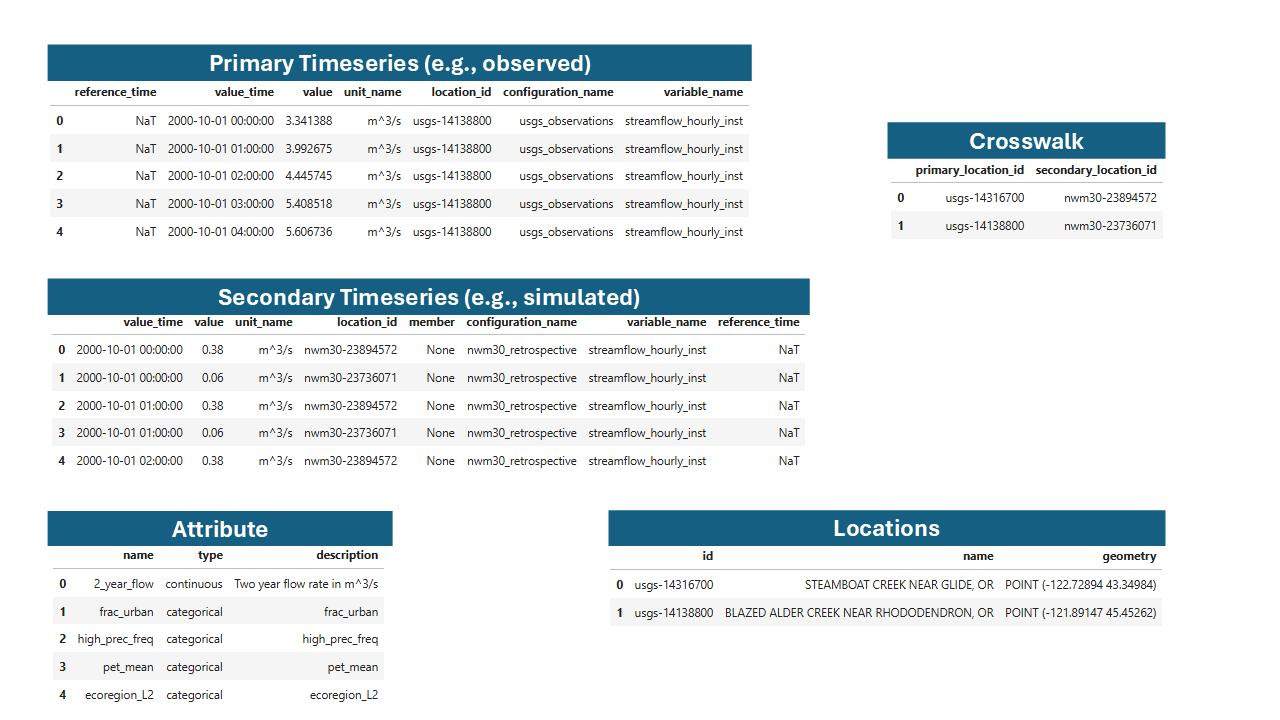
Example NWM and USGS data in the TEEHR data model.#
The view brings together multiple tables:
Primary Timeseries: Observed data (e.g., USGS streamflow)
Secondary Timeseries: Simulated data (e.g., NWM forecasts)
Locations: Point geometries
Location Crosswalks: Mapping between primary and secondary location IDs
Location Attributes: Attribute values for each location
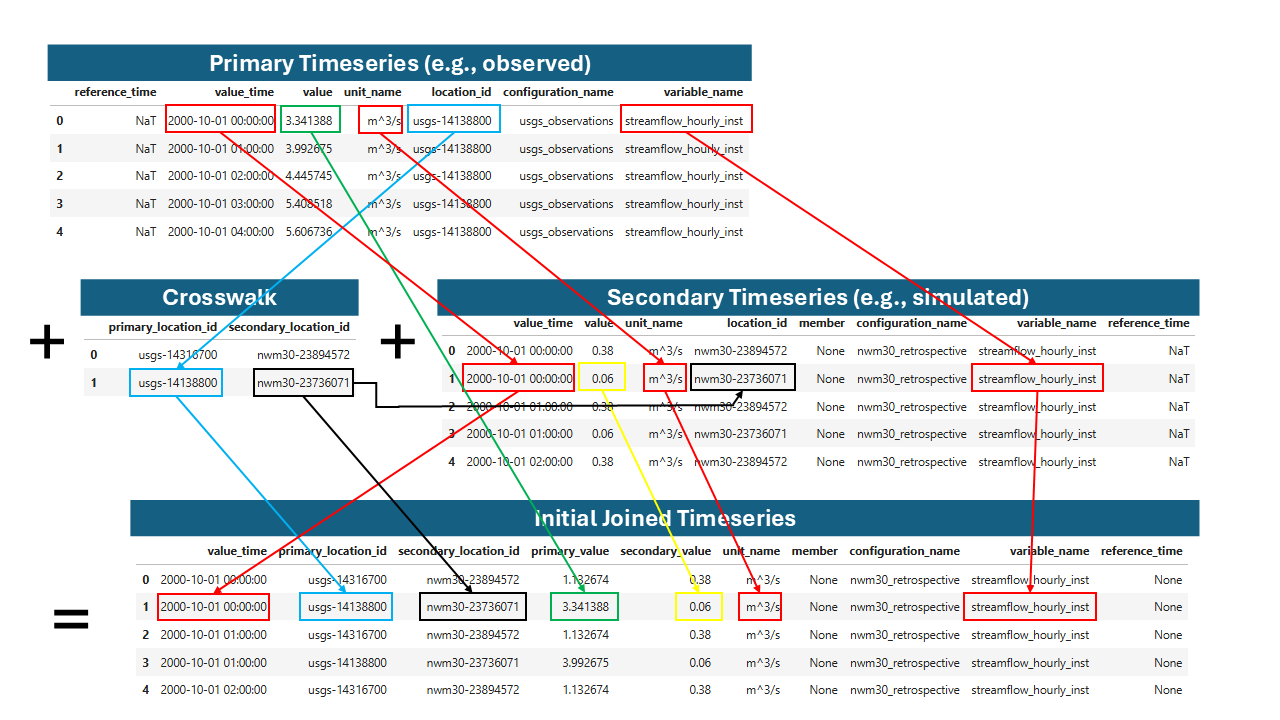
Joining primary and secondary values by location, time, variable name, and unit. The variable joining has some special behavior that allows any instantaneous values to be joined to any other instantaneous values regardless of the interval, which is covered in the documentation for the view method parameters.#
The result is a unified table for analysis such as calculating metrics or generating visualizations.

Example joined timeseries table.#
Joined Timeseries Columns#
Columns that exist on both the primary and secondary side, and can differ, have a
primary_ and a secondary_ version. location_id is the location in the
locations table.
location_id- The location ID fromlocations. Location attributes and geometry join on this column, and it is what metrics are usually grouped by.primary_location_id- Thelocation_idfromprimary_timeseries. It is the same aslocation_idunless the primary data uses an alias fromlocation_id_aliases.secondary_location_id- Thelocation_idfromsecondary_timeseries.primary_value/secondary_value- The paired values.primary_configuration_name/secondary_configuration_name- The configuration of each side.primary_variable_name/secondary_variable_name- The variable of each side. These can differ, for example when instantaneous values with different periods are joined.unit_nameandvalue_time- Must be equal for a row to join, so there is one of each.reference_timeandmember- From the secondary timeseries.
The location_crosswalks and location_id_aliases tables and the timeseries tables
and views keep their own column names; for example, primary_location_id in
location_crosswalks is the locations ID.
When a location has more than one primary data source, each secondary value is joined
to every primary source, unless configuration_pairs limits which primary
configurations a secondary configuration is joined to. Include
primary_configuration_name in group_by to compute metrics per primary source.
See Tables for loading location_id_aliases and configuration_pairs.
Note
Upgrading from 0.8. These column names changed in TEEHR 0.9, and joined tables written by earlier versions must be regenerated:
0.8 column |
0.9 column |
|---|---|
|
|
|
|
|
|
(none) |
|
(none) |
|
(none) |
|
ev.joined_timeseries_view(add_attrs=True).write("joined_timeseries")
Re-apply any calculated fields you had added, and update code that groups or filters on the old names.
Basic Usage#
Create a joined timeseries view:
import teehr

ev = teehr.LocalReadWriteEvaluation(dir_path="/path/to/evaluation")

# Basic joined view
jt = ev.joined_timeseries_view()

# View as Spark DataFrame (recommended for large datasets)
jt.to_sdf().show()

# Or convert to pandas for smaller datasets
df = jt.to_pandas()
Adding Location Attributes#
Join location attributes to the timeseries data:
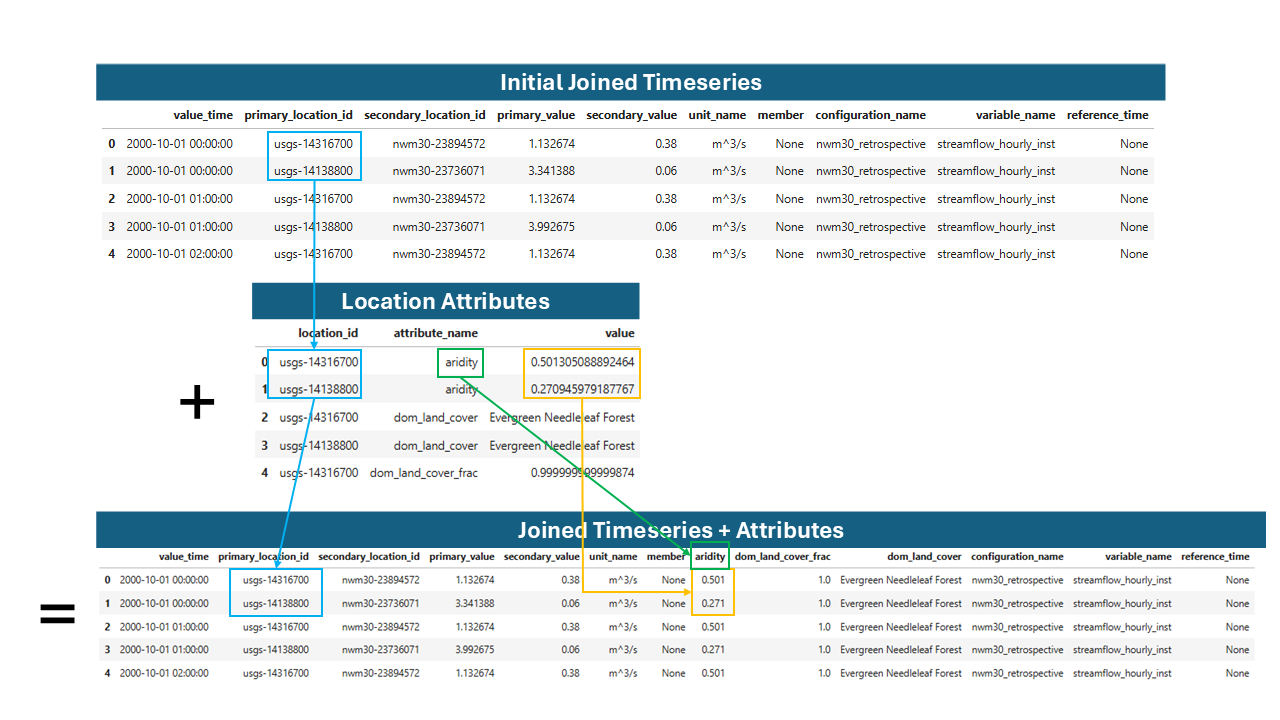
Joining attributes to the joined timeseries table.#
# Add all available attributes
jt = ev.joined_timeseries_view(add_attrs=True)

# Add specific attributes only
jt = ev.joined_timeseries_view(
    add_attrs=True,
    attr_list=["drainage_area", "ecoregion"]
)
Filtering Views#
Apply SQL-style filters to narrow results:
# Filter by location pattern
jt = ev.joined_timeseries_view().filter(
    "location_id LIKE 'usgs-02424000'"
)

# Filter by date range
jt = ev.joined_timeseries_view().filter(
    "value_time BETWEEN '2020-01-01' AND '2020-12-31'"
)

# Multiple filter conditions
jt = ev.joined_timeseries_view(add_attrs=True).filter("""
    location_id LIKE 'usgs-02424000'
    AND CAST(drainage_area AS DOUBLE) > 100
    AND secondary_configuration_name = 'nwm30_retrospective'
""")
Materializing Views to Tables#
For repeated queries, materialize a view to an Iceberg table:
Note
Writing a view to a table is only available for users with write permissions,
so LocalReadWriteEvaluation is required.
Note
Materializing a view creates a physical table with the current data. Future changes to source tables won’t affect the materialized table unless you overwrite it.
# Write view to a named table
ev.joined_timeseries_view(add_attrs=True).write_to("joined_with_attrs")

# Later, query the materialized table directly
df = ev.table("joined_with_attrs").aggregate(
    metrics=[DeterministicMetrics.KlingGuptaEfficiency()],
    group_by=["location_id"]
).to_pandas()
Other Views#
LocationAttributesView#
Pivots the location_attributes table from long format to wide format, with
each attribute as a column. This view is useful for joining location attributes
to timeseries data or for other analyses that require a wide format, similar to a
traditional geospatial “attributes table”.
# Pivot all attributes
la = ev.location_attributes_view()
la.to_sdf().show()

# Pivot specific attributes
la = ev.location_attributes_view(
    attr_list=["drainage_area", "percent_forest"]
)

# Filter and view
la.filter(
    "CAST(drainage_area AS DOUBLE) > 100"
).to_sdf().show()

# Materialize for reuse
ev.location_attributes_view().write_to("pivoted_attrs")
See also: LocationAttributesView
PrimaryTimeseriesView#
View of primary timeseries with optional location attributes:
# Basic view
pv = ev.primary_timeseries_view()

# With location attributes joined
pv = ev.primary_timeseries_view(
    add_attrs=True,
    attr_list=["drainage_area", "ecoregion"]
)

# Filter and view
ev.primary_timeseries_view().filter(
    "ecoregion = 'Coastal Plains'"
).to_sdf().show()
See also: PrimaryTimeseriesView
SecondaryTimeseriesView#
View of secondary timeseries with optional location attributes. Tis view also adds
the primary_location_id so you can filter both the primary_timeseries and
the secondary_timeseries_view() by the same location_id value for convenience.
# Basic view
sv = ev.secondary_timeseries_view()

# With attributes
sv = ev.secondary_timeseries_view(
    add_attrs=True,
    attr_list=["drainage_area"]
)

sv = ev.secondary_timeseries_view().filter(
    "primary_location_id = 'usgs-02424000'"
).to_sdf().show()
See also: SecondaryTimeseriesView
Calculated Fields#
TEEHR provides two categories of calculated fields that can be added to views:
Row-Level Calculated Fields: Compute values independently for each row
Timeseries-Aware Calculated Fields: Perform computations across related timeseries groups
Row-Level Calculated Fields#
These fields operate on individual rows without aggregation or consideration of other rows. They are useful for extracting components from timestamps, normalizing values.
See also: RowLevelCalculatedFields
import teehr.calculated_fields.models.row_level as rcf

# Add month and water year from timestamps
jt = ev.joined_timeseries_view().add_calculated_fields([
    rcf.Month(),       # Extracts month (1-12)
    rcf.Year(),        # Extracts calendar year
    rcf.WaterYear(),   # Computes water year (Oct-Sep)
])

jt.to_sdf().show()
Available row-level fields:
Configuring Row-Level Fields#
Most fields have configurable parameters:
import pandas as pd
import teehr.calculated_fields.models.row_level as rcf

# Custom field names and input columns
month_field = rcf.Month(
    input_field_name="value_time",
    output_field_name="my_month_column"
)

# Normalized flow with custom attribute
normalized = rcf.NormalizedFlow(
    value_field_name="primary_value",
    attribute_field_name="drainage_area",
    output_field_name="normalized_flow"
)

# Custom seasons mapping
seasons = rcf.Seasons(
    season_mapping={
        "dry": [6, 7, 8, 9, 10],
        "wet": [11, 12, 1, 2, 3, 4, 5]
    },
    output_field_name="season"
)

# Uniform lead time bins
lead_time_bins = rcf.ForecastLeadTimeBins(
    bin_size=pd.Timedelta(hours=6),
    output_field_name="forecast_lead_time_bin"
)

jt = ev.joined_timeseries_view(add_attrs=True).add_calculated_fields([
    month_field,
    normalized,
    seasons,
    lead_time_bins,
])
Note
Forecast lead time bin edges. Bins are start-exclusive and end-inclusive
by default (closed="right"), so a bin spans (start, end]. With
bin_size=pd.Timedelta(hours=6), lead times of 1 through 6 hours fall in
the first bin, 7 through 12 in the second, and so on. An 18-hour forecast
therefore produces three bins rather than four.
This matters because forecasts usually have no value at lead time zero. A
lead time that falls outside every bin – including exactly zero – yields
NULL rather than being folded into the first bin.
Pass closed="left" for the previous [start, end) behaviour, in which
a lead time of exactly one bin width starts the next bin. Note that this
changes which rows land in which bin, so results computed under the two
settings are not comparable.
Explicit bin definitions take start and end keys:
rcf.ForecastLeadTimeBins(
    bin_size=[
        {"start": "0 hours", "end": "6 hours"},
        {"start": "6 hours", "end": "18 hours"},
    ],
)
The older start_inclusive / end_exclusive spellings are still
accepted, but they name a behaviour that closed now controls, so the
generic keys are preferred.
Timeseries-Aware Calculated Fields#
These fields perform computations that require knowledge of the full timeseries, such as percentile calculations or event detection.
Note
In Spark-backed execution, percentile-based calculated fields use Spark’s
approximate percentile aggregation. Spark computes this from a distributed
summary of the full group rather than from a simple random sample, which is
usually much faster and scales better on large datasets. The practical
impact is that event thresholds can differ slightly from exact pandas
quantiles, especially for small groups or when many values lie near the
threshold. If exact quantile cutoffs are important, run
add_calculated_fields(..., engine="python").
See also: TimeseriesAwareCalculatedFields
import teehr.calculated_fields.models.timeseries_aware as tcf

# Add event detection based on percentile threshold
jt = ev.joined_timeseries_view().add_calculated_fields([
    tcf.AbovePercentileEventDetection(
        quantile=0.85,               # 85th percentile
        value_field_name="primary_value",
        output_event_field_name="event_above",
        add_quantile_field=True      # Also output the threshold value
    )
])
Available timeseries-aware fields:
Event Detection#
Event detection identifies periods where values exceed (or fall below) thresholds, useful for analyzing high-flow or low-flow events.
Above Percentile Events#
Detect events when values exceed a percentile threshold:
import teehr.calculated_fields.models.timeseries_aware as tcf

# Detect high-flow events (above 85th percentile)
event_detection = tcf.AbovePercentileEventDetection(
    quantile=0.85,
    value_field_name="primary_value",
    output_event_field_name="event_above",
    output_event_id_field_name="event_above_id",
    add_quantile_field=True,
)

jt = ev.joined_timeseries_view().add_calculated_fields([event_detection])
jt.to_sdf().show()

# Result includes:
# - event_above (bool): True if value > 85th percentile
# - event_above_id (str): Unique ID for continuous event periods
# - quantile_value (float): The 85th percentile threshold value
Below Percentile Events#
Detect events when values fall below a percentile threshold:
# Detect low-flow events (below 15th percentile)
low_event = tcf.BelowPercentileEventDetection(
    quantile=0.15,
    value_field_name="primary_value",
    output_event_field_name="event_below",
    output_event_id_field_name="event_below_id",
)

jt = ev.joined_timeseries_view().add_calculated_fields([low_event])
Above Threshold Events#
Detect events when values exceed a threshold read from a DataFrame column (e.g., an
attribute field loaded with add_attrs=True). Threshold values are cast to float
before comparison, so string-typed attribute fields are supported.
import teehr.calculated_fields.models.timeseries_aware as tcf

# Detect high-flow events where primary_value exceeds the 'flood_stage' attribute
event_detection = tcf.AboveThresholdEventDetection(
    threshold_field_name="flood_stage",
    value_field_name="primary_value",
    output_event_field_name="event_above",
    output_event_id_field_name="event_above_id",
)

jt = ev.joined_timeseries_view(add_attrs=True).add_calculated_fields([event_detection])
jt.to_sdf().show()

# Result includes:
# - event_above (bool): True if value > flood_stage
# - event_above_id (str): Unique ID for continuous event periods
Below Threshold Events#
Detect events when values fall below a threshold from a DataFrame column:
# Detect low-flow events where primary_value is below the 'low_flow_threshold' attribute
low_event = tcf.BelowThresholdEventDetection(
    threshold_field_name="low_flow_threshold",
    value_field_name="primary_value",
    output_event_field_name="event_below",
    output_event_id_field_name="event_below_id",
)

jt = ev.joined_timeseries_view(add_attrs=True).add_calculated_fields([low_event])
Combining Multiple Calculated Fields#
Chain multiple calculated fields together:
import teehr.calculated_fields.models.row_level as rcf
import teehr.calculated_fields.models.timeseries_aware as tcf

jt = ev.joined_timeseries_view(add_attrs=True).add_calculated_fields([
    # Row-level fields
    rcf.Month(),
    rcf.WaterYear(),
    rcf.Seasons(),
    rcf.NormalizedFlow(),
    # Timeseries-aware fields
    tcf.AbovePercentileEventDetection(quantile=0.90),
])

# Now query metrics grouped by these new fields
metrics_df = jt.aggregate(
    metrics=[
        DeterministicMetrics.KlingGuptaEfficiency(),
        DeterministicMetrics.NashSutcliffeEfficiency(),
    ],
    group_by=["location_id", "water_year", "season", "event_above_id"],
).order_by(["location_id", "water_year"]).to_pandas()
Materializing Computed Fields#
For repeated use, write calculated fields to a table:
# Compute and materialize
ev.joined_timeseries_view().add_calculated_fields([
    tcf.AbovePercentileEventDetection()
]).write_to("joined_timeseries")

# Query the materialized table
metrics_df = ev.table("joined_timeseries").aggregate(
    metrics=[DeterministicMetrics.KlingGuptaEfficiency()],
    group_by=["location_id", "event_above"],
).to_pandas()
Complete Workflow Example#
A typical workflow combining views, calculated fields, and metrics:
import teehr
from teehr.metrics import DeterministicMetrics
import teehr.calculated_fields.models.row_level as rcf
import teehr.calculated_fields.models.timeseries_aware as tcf

# Open evaluation
ev = teehr.LocalReadWriteEvaluation(dir_path="/path/to/evaluation")

# Create view with attributes and calculated fields
jt = ev.joined_timeseries_view(
    add_attrs=True,
    attr_list=["drainage_area", "ecoregion"]
).add_calculated_fields([
    rcf.Month(),
    rcf.WaterYear(),
    rcf.Seasons(),
    rcf.NormalizedFlow(),
    tcf.AbovePercentileEventDetection(
        quantile=0.90,
        add_quantile_field=True
    ),
])

# Filter to specific criteria
jt = jt.filter("""
    location_id LIKE 'usgs-%'
    AND value_time >= '2019-10-01'
    AND CAST(drainage_area AS DOUBLE) < 1000
""")

# Query metrics grouped by computed fields
metrics_df = jt.aggregate(
    metrics=[
        DeterministicMetrics.KlingGuptaEfficiency(),
        DeterministicMetrics.RelativeBias(),
        DeterministicMetrics.RootMeanSquareError(),
    ],
    group_by=["location_id", "water_year", "ecoregion", "event_above_id"],
).order_by(["location_id", "water_year"]).to_pandas()

print(metrics_df.head())

# Clean up
ev.spark.stop()